Project Summary
- Objective: As a part of a larger inclusive design initiative, I worked alongside 2 UX designers to understand how to improve the experiences of users who utilize VoiceOver, iOS’s native screen reader.
- Methods: Survey & 1-on-1 interviews
- Impact: This research was critical because the initial hypotheses the UX designers had about how to create the best experience were wrong. Therefore, equipped with the insights I provided, they were able to confidently bring proposed improvements to the developers and continue the implementation process.
We presented this project at Figma Config 2022, and you can watch the video of our talk at this link: https://www.youtube.com/watch?v=O9FE6NElP4c
Finding a Starting Point
At Sonos, initiatives surrounding accessibility and inclusive design were starting to gain more traction within the design team. A group of us were meeting regularly to learn more about the space, and wanted to begin making an impact by making tangible changes that would increase the inclusivity of our products and experiences.
Another researcher had previously conducted a survey to users who had accessibility needs, including vision and mobility. This survey identified several different issues that could be addressed, ranging from some experiences in the app being difficult to navigate and inaccessible hardware interfaces. I was contacted by 2 UX designers in our inclusive design group who were working on a project that would address some of these issues within a key experience of the Sonos app, but they needed to learn more from users before implementing any changes.
The specific area that they wanted to address was the “Now Playing” screen of the app. This screen gave the user information about what content was currently playing, such as the song title and artist, and also provided controls such as skipping or pausing. However, the screen reader experience was not ideal, which made it difficult for low vision users to successfully navigate this screen. We focused specifically on VoiceOver, the screen reader for iOS.
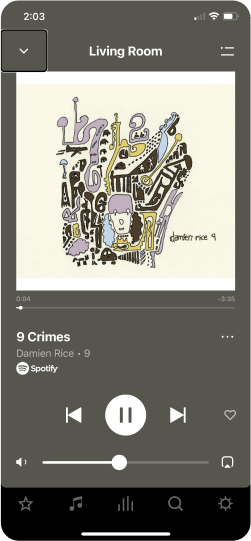
The designers shared with me their hypotheses about how they thought this experience should ideally be implemented. However, we needed more information to validate these assumptions, especially since none of us relied on screen readers in our daily lives. Talking to users who actually lived these experiences day-to-day was absolutely critical.
The Hypotheses Were Wrong
Partnering with our Beta team, we sent out a survey to Beta testers who voluntarily identified themselves as having low vision or no vision. This survey allowed us to gain more general information about the ideal VoiceOver experience, current user satisfaction, and identify any further issues occurring.
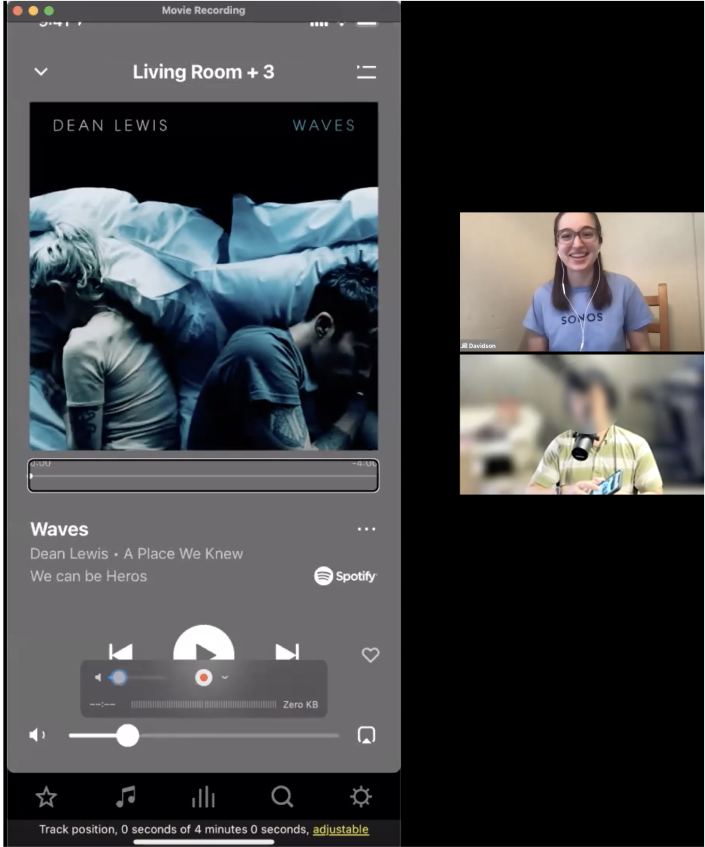
After conducting the survey, I reached out to some of the respondents for a follow-up interview to go more in-depth on what they mentioned in the survey and get specific feedback about the Now Playing screen. Some users were able to show us exactly how they used VoiceOver in the app. These interviews were incredibly eye-opening for myself and the designers who were observing.
In fact, we learned that all of our initial hypotheses were wrong. One of the main hypotheses the designers had was that the VoiceOver screen reader should read out elements of the screen in order of importance and priority, such as reading the title of the song first, in order to access that information more quickly or perform common tasks. However, through the research, we learned that it’s a much better experience for the screen reader to read out elements from left to right and top to bottom.
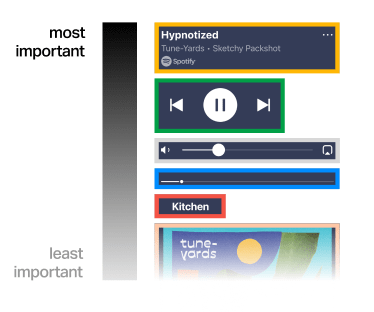
(image created by Bona Kim & Miki Bin)
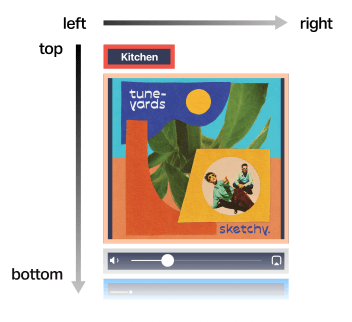
(image created by Bona Kim & Miki Bin)
This information was crucial to successfully improving the experience. Had we not conducted research and operated based on assumptions and hypotheses, the experience would have been made worse instead of better. The designers were able to move forward with improving the experience confidently based off of the insights from research. This work was the first step in demonstrating the importance of weaving accessibility into the workstream from the beginning.
Telling the Story & Inspiring Others
One of the designers I worked with reached out to myself and our other teammate when she saw applications were open for Figma’s Config conference in 2022. She thought that our story would be great to share with others to inspire them to begin improving accessibility in their organizations. We all agreed that we would apply, and to our surprise and delight, we were accepted!
For several weeks, I worked with the designers to come up with the best way to tell the story of what we did. We went through several iterations of how we wanted to structure our talk, what details we wanted to mention, and how to leave the audience with an actionable message. We presented drafts of our talk to several of our teammates to get feedback and continue to iterate along the way. Working to condense months of work into a 20 minute talk was certainly a challenge, but really helped to refine my ability to tell a story in an engaging, concise, and coherent way. I am incredibly proud of what we did, and you can watch the talk here:
 Jill Davidson