Project Summary
- Objective: An upcoming product was going to have a setup experience that was different from past Sonos products. Therefore, we needed to make sure that this new setup process was easy for users to understand and perform.
- Research Methods: In-person interviews & usability testing
- Impact: My insights led to iteration on the experience, which we validated in a second round of testing. The updated experience was easier and less frustrating, demonstrating that we were on the right path to creating the best possible setup experience.
Understanding the Context & Objective
I was asked to conduct research about a product that would have an option for the initial setup process that differed from other Sonos products. Because it was something new to our portfolio, it was critical to evaluate that users were able to successfully set up their product with minimal difficulty and frustration.
In order to fully understand what I was evaluating, I met with the UX designers working on this product. From a technical perspective, this setup process was more complex than products I had worked on in the past, but luckily we had high-fidelity hardware prototypes we could use for testing.
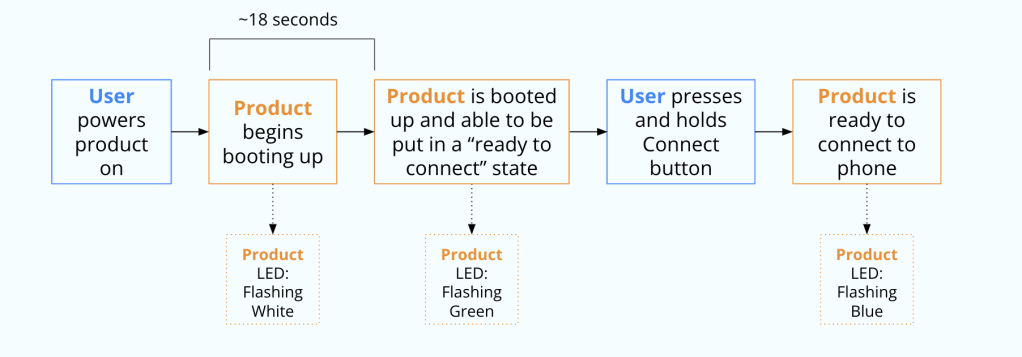
One of the main indicators for users during the setup process was an LED on the speaker that would change colors depending on what state the product was in. The setup process followed these steps:
- User powers product on
- Product begins booting up, indicated by a flashing white LED – this takes about 18 seconds to complete
- Product is booted up and able to be put in a “ready to connect” state, indicated by a flashing green LED
- User presses and holds Connect button*
- Product is ready to connect to phone, indicated by a flashing blue LED
*note that Connect is a placeholder name for confidentiality reasons
Evaluating the Setup Process
One important aspect of the study to consider was that this setup process not only differed from other Sonos products, but also differed from mental models users may have built while using competitor products. I worked with an external recruiting agency to recruit 10 participants that included a mix of current Sonos users and users of competitor products. We also included a mix of different demographics such as age and gender. This would allow us to understand how prior use of Sonos products or competitor products influenced how users approached this new setup experience, and how we could improve the process for a broader population.
After conversations with UX designers and product managers, I decided that the best way to evaluate this setup process was to conduct a usability test to identify pain points, paired with an interview to dive deeper into the experience. During the research sessions, I mostly observed, but prompted participants with questions, such as what they thought was happening with the product or what they were thinking, when they appeared to be stuck and were no longer thinking out loud. Afterwards, we had a longer discussion about what happened in order to identify specific pain points and improvement opportunities.
What We Learned
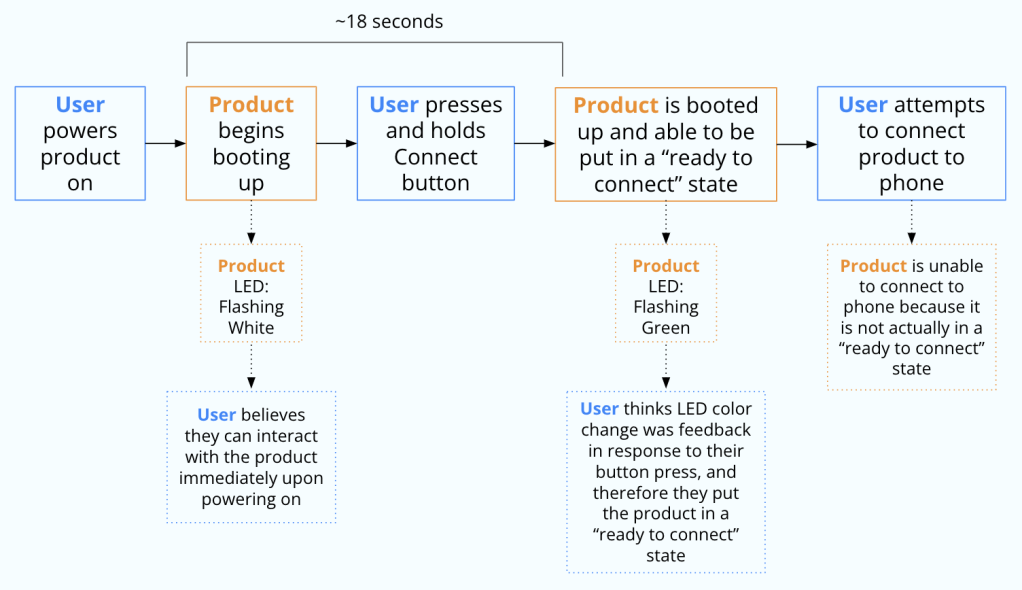
8 of the 10 participants were able to successfully complete the setup process on their own without additional help from me. However, even though the success rate was relatively high, many participants experienced frustration during the set up process and/or made mistakes that confused them. Here is the process many of the participants took:
- Power product on
- Press and hold Connect button while LED is flashing white
- LED changed to flashing green
- Look for product in phone menu, but can’t find it
The primary mistake was that they were attempting to put the product in a “ready to connect” state before it was fully booted up and ready to do so, but the change in LED color made them initially think they were successful. Most participants troubleshooted on their own by looking at the instructions that came with the product or by simply trying to press and hold the Connect button again. Many indicated that the LED colors weren’t clear to them, and were hoping to find that information in the instructions. Some were completely stuck and eventually required assistance.
From this, I identified two main issues in the setup process:
- Participants were not expecting to have to wait for the product to “boot up” before interacting with it, and therefore were pressing the Connect button too soon.
- The LED colors on the product did not clearly indicate to participants what was happening. Green and white were not familiar colors on a speaker LED, especially to users who didn’t have prior experience with Sonos products.
Iterating and Re-testing
Working with the UX designers, we identified ways that we may be able to improve the setup process. Due to technical constraints, we could not remove the boot up time for the product or change the colors of the LEDs. However, we could provide more information to the user about what was happening. In collaboration with content strategists and packaging designers, we made the following changes:
- Add information in the instructions about what the different LED colors/behaviors mean
- Include clearer information in a more visible place in the instructions letting users know the product needs time to boot up before they can interact with it, and how they will know it’s done booting up
- Have the product play a “welcome sound” in addition to the LED changing from flashing white to flashing green to indicate the product was done booting up
We ran a second round of research with a new set of participants, using a nearly identical approach to the first round. In this second round of testing, 9 out of 10 participants were able to successfully set up the product on their own. While this was not a statistically significant change compared to the 8 out of 10 in the first round, qualitative data indicated that users were less frustrated with the setup process due to easier troubleshooting with the additional information in the instructions. It still wasn’t perfect, of course, and we identified some areas in the instructions we could improve further, but it was a signal that we were heading in the right direction. Participants did also appreciate the addition of a sound when the product finished booting up as a delightful aspect of the experience, though it did not appear to help or hurt their understanding of the state of the product.
Confidently Creating An Improved Experience
While participants still made mistakes, they were able to recover more quickly and easily than in the first round of testing. We recognized that putting the additional information in the instructions wouldn’t help everybody initially, since we also learned that many users don’t read instructions before attempting to set up a product. However, having the right information in the instructions was crucial for users to be able to recover when they made a mistake.
After the study, we did further iterations specifically on the instructions based on what we learned using unmoderated usability testing on usertesting.com and dscout. This allowed us to make a confident decision when finalizing the instructions. Therefore, we were able to improve the user experience of this setup process, even with technical constraints that did not allow us to change the actual product behavior that was causing the confusion.
 Jill Davidson